A: Nearly all customers take DV-AVI files as uploads, on USB stick or
hard disk (depending on running times). Video files are higher
quality than DVDs, easier to edit, share and back up, so are a much
better archive format. These hard disk transfers are suitable for
both PC and Mac video editing and cost just £7 - £9 per hour for 10
hours or more for most formats. All video formats are available
with this option. You can provide the hard disk, or we can supply
that for you. Small jobs of up to a few hours may fit a USB stick,
we keep USB sticks in stock too. Additionally I offer smaller
MPEG4 files at a very small cost, these will play on most modern TVs
which have a USB socket. The DV-AVI files for editing consume 13GB
per hour and the optional smaller viewing MPEG4 files are generally
around 4GB per hour.
Q: Why are www.video99.co.uk services so much cheaper than the
other companies?
A: Because this service is run by a video engineer who is more
interested in doing a good job than making a huge profit. Profits
are largely fed back into video equipment so I can provide more options,
video formats and services, and keep my video equipment collection all
running. The quality goes into the recordings, I don't waste your
money on fancy packaging or "free" printed covers. DVDs supplied
in sleeves and are printed with the video99.co.uk logo and have your
title carefully
handwritten on them and space for you to add more detail if you
wish. We also save you 20% because we operate nicely
below the VAT threshold limit.
Q: I've heard that DV-AVI files don't work with Mac computers, is
that right?
The next few Q/A concern DVDs but these
days I recommend video files on a USB stick instead. Only select
DVDs if you need them for some special reason.
Q: How long will DVDs last?
A: It's not really known how long DVDs will last,but if you are
careful with storing them it should be long enough that you can consider
it to be a very long time indeed. I use topquality (expensive)
DVDs, not the cheap ones I know some of my competitors use. I
don't use any encryption on the DVDs I supply, sosoftware such as Nero
(PC) or Toast (Mac) can easily make exact duplicates. If you want
to be very cautious, you could makecopies of the DVDs I supply, in about
5-10 years from now, and then keep making replacements every 5-10
years. Alternatively, you canuse Nero etc. to make an image files
of the DVDs (the file type will be .iso for example) and then readily
make up extra copies from theseimages at any time in the future.
There's an interesting item on BBC news about
thissubject. The most important thing anyway is to look after your
DVDs, don't scratch them or subject them to temperature extremes
ormoisture. If you want your recordings to last forever, then
consider instead taking them as DV-AVI video files on a computer
harddisk, these are ideal for backing up, uploading, copying and editing
with almost any PC or Mac video editing software. Most
customers now take video files rather than DVDs. Any
questions, just
ask.
Q: Do DVDs come in boxes or sleeves?
A: By default the DVDs are supplied in plain sleeves to keep the
costs down. If you would like your DVDs in boxes with colour
printed inserts, these are just £5.50 per DVD (falling to £3.50 per DVD
when taking extra copies), and are ideal for gifts. These boxes
show a number of still shots taken from the tapes, and are very
attractive. When taking several DVDs, boxes may be doubles,
triples or quad to save space unless you specify single boxes only, and
this lowers cost too. Each box is £5.50 plus £1 for each
additional DVD, so £5.50 for a single box, £6.50 double box, £7.50
triple box, £8.50 quad box. Boxes for extra copies are £3.50 for
single boxes, £4.50 for double, £5.50 for triple, £6.50 for quad.
These boxes are made up to a very high standard, a lot of work goes into
carefully selecting beautiful shots for the covers, and they are printed
by colour laser printer so they will not fade. Normally each DVD
box design is specially made showing pictures from the DVDs within that
box, but for large jobs where some customers would like the same design
for several boxes, the price falls to the "extra copies" price for the
first set too. That said, very few customers still take DVDs,
video files on a hard disk or USB stick (depending on quantity) are
recommended.
Q: Will DVDs play in my DVD player?
A: I use the most compatible DVD-R single layer type of disk which
will play in around 95% of domestic DVD players. A few computer
drives, games consoles or old DVD players might possibly struggle with
any kind of recorded disk. If you find you cannot play a DVD, I
can send an alternative disk for you to try at no charge. I use
the highest possible quality disks for maximum compatibility, so
playback problems are rare. Sometimes a recorded DVD won't play on
Windows Media Player; I would recommend avoiding this particular
program, use alternative DVD player software such as VLC Player.
Q: What is Deluxe Menu?
A: New video title at the start of each video tape, and chapter
pointsinserted at the start of new recordings and subject material.
Titles for each chapter of your choice, if the information is provided
withthe tape. Icons show what each chapter contains. This is all very
similar to the kind of professional DVD video you can buy and rent. Upto
90 minutes of video footage copied to each DVD for ultimate picture
quality, or around 110 minutes with very good picture quality.
Ifnecessary I may be able to extract small segments of garbage
recording (bits of TV programme mixed with your prized camera footagefor
example), and I can also clean up the video material if necessary using
a semi-professional digital timebase corrector to help improvewobbly
recordings. Everyone who commented on this service has been delighted
with the results. Cost for most formats is £22 for the firstDVD and just
£3.50 per extra copy. See more here.
Q: What is Basic Menu?
A: A straight run of your video tapes onto DVD. A new title will start
witheach video tape, and I will try to name these appropriately. Chapter
points approximately every 5 minutes, these will not be labelled.
No icons, no fancy menus, and probably no editing of unwanted
materialbut I may be able to make small edits for you. A digital
timebase corrector is used to help clean up wobbly recordings. Up to150
minutes per DVD. You will be very happy with the quality of these
recordings, it is only the DVD menus which are basic. Cost for
mostformats is £13 for the first DVD and just £3.50 per extra
copy. See
more here.
Q: What kinds of DVD are there?
A: Normally I will record your tapes to DVD-R because this is the most
compatible type. But I can offer DVD+R if you require, just let me
know if you think your player only takes this type. What other
types of DVD exist? There is DVD-RAM, and I can do this too if you
require, one customer has taken this format so he can edit the
recordings himself. Though I use rewritable DVD-RW disks
internally, it would be unusual for you to require these, and even more
unusual to require DVD+RW. These latter types are re-writable or
eraseable and are used by computers and some DVD recorders.
Confused? Just
ask.
Q: Which is cheaper, DVD or video files?
A: My cheapest service with basic menus, will take up to 2 hours and
30 minutes on each DVD. I would recommend limiting this to 2 hours
where possible for even better results. It is true that much more
than this can be recorded on a DVD but the quality will suffer, and I
wouldn't want you to be disappointed. Video files are generally
priced per hour, so you can't compare the prices exactly, but in general
the costs are similar, or DVD may in some cases be slightly
cheaper. However since DVD is not easy to back up, an extra copy
is recommended with DVD so it would likely end up being more expensive
than video files, as well as lower quality, unsuitable for editing and
as an archive format. So unless there is some very special reason
you need DVD, don't use them.
Other general Q/A.
Q: How do I pay, where do I send the tapes?
A: Please contact
me first and I'll send you the postal address to send the tapes,
it's near Plymouth. Special Delivery is the best option for
precious recordings. I don't want to publish the address here,
since tapes then turn up without sufficient contact details, so I always
ask that people email me first or use the contact form. In most
cases I calculate the bill once the work is completed and send payment
details then. Most customers use bank transfer or the PAYM app.
but cheques are still possible. Unfortunately a new law in 2018
made Paypal essentially impossible to use any more. It's risky to
send cash of course but UK Pounds or (by prior agreement) the equivalent
in Euros is OK if it can be sent safely. Please avoid use of
staples in the packaging.
Q: Is the quality good?
A: The quality is excellent. Very often people have commented on
how much better the transfer results are than they remember the
tapes. This is because I use top quality equipment and I know how
to get the very best out of it. Of course, if your original
recordings are very poor, were already copies, or the tapes have become
damaged, then the results may be less than perfect but still generally
much better than you will get on your home equipment. Most
recordings are run through an expensive Digital Timebase Corrector which
allows me to make subtle technical corrections to the picture.
Sound is also very important, so I use Hifi Stereo equipment for any
video tape which might be in stereo including Betamax.
Q: Can you fix problems with the recordings?
A: Sometimes, it depends what is wrong. If the colours are
wrong, too green, too blue, or too dark for example, then I can often
improve upon these problems. I have expensive Digital Timebase
Correctors which allow for some adjustment of picture
imperfections. But they can't perform miracles, if the recording
is very grubby and shaky then it will not completely fix the
problems. A common problem with copied tapes is that the colour
"shifts" downwards or to the right of the rest of the image, and I can
compensate for this and other defects. Here is a picture of a tape which I recently
repaired and recovered the recordings.
Q: Are tapes safe?
A: Absolutely. You can send them by Special Delivery if the
recordings are important to you, and they will never leave my location
until returned to you. I usually send the transfers on ahead so
you can be sure you are happy with them before I return the tapes.
Q: Some tapes contain sensitive material, is this safe with
video99.co.uk?
A: I'm often asked this. Transfers in the past have
included court case evidence, irreplaceable footage of deceased friends
and family, "private" personal recordings, and of course lots and lots
of children growing up. Your tapes are always treated with the
utmost care, and neither the tapes nor the video files created from them
are ever copied, distributed, placed on vulnerable computer networks or
otherwise compromised in any way. I'm a family man myself with a
wife and young children, so I absolutely share your concerns with
security of your recordings.
Q: Will you transfer copyright tapes? What if the tape is
"copyproof"?
A: I am only providing the transfer service, I must leave copyright to
you, the owner of the tape. In most cases, making a single copy of
a recording you already have, such as a film or a TV programme, would be
considered to be "fair use". Copyproof VHS tapes (those encoded
with Macrovision) may be copied but only for "fair use"
quantities. Example: I was asked to copy a set of copyrighted
training tapes from VHS to DVD for a marshal arts instructor. I
did this, and the instructor was so pleased with the results he asked me
to duplicate sets of them for his students. I reminded the
instructor of his copyright obligations and we decided that the one set
of DVDs was enough.
Q: I couldn't fill in your form, it didn't work
A: We have a simple
order
form. If this doesn't work or isn't helpful, just
email me and I'll help you personally. Include your postal
address, and any information on how many tapes you have, and I'll get
back to you promptly.
Q: I don't want the tapes returned once I have the transfers.
A: We always recommend that you do take tapes back, just to be on the
safe side, however I can dispose of tapes if you are really sure.
If you've paid for return post already and then change your mind and
decide not to take them back, then the postage charge will already
likely cover the disposal cost. If you've not paid for return
postage and want me to dispose of tapes for you, the cost is generally
about £1 per kg. Tapes are disposed of around two weeks after the
work has been sent, or earlier if you tell me that you are happy for the
tapes to go.
Q: How quick is the turnaround?
A: Very quick. Smaller jobs are usually done same day, and
longer ones with lots of tapes only take a few days. The reason is
that I have several sets of recording equipment and more video recorders
of various types than I wish to count, so often I can carry out more
than one job at once.
Q: You do a lot of different kinds of video tapes, are there any
you don't do?
A: Unless someone would like to tell me otherwise, I believe
video99.co.uk has the largest selection of video cassette transfer
formats on offer in the UK. I don't do reel-to-reel video
tapes of any type, nor film but can recommend Chris at Save
Those
Memories who does cine films and slides. Nearly all
recordings from equipment sold outside the UK are possible. Just
email me if you can't find what you want on my video99.co.uk web page because I am adding new
formats and capabilities all the time.
Q: Should I send original camcorder tapes or send VHS copies?
A: Always send original tapes rather than copies, even if you have to
ask me to edit some parts out of the tapes for you. I would rather
do that than have you lower the quality of your precious recordings by
using VHS. All modern camcorders and almost all camcorders built
in the last 30 years, are much better quality than VHS.
Q: Are the testimonials real? Are there more comments not
listed?
A: All the testimonials are very real. We are listed on the
independent Freeindex service, you can read and add to reviews
there. We also have a collection
of fascinating testimonials from some famous names, see the famous names testimonials page.
Q: Do you do discounts?
A: Yes of course. Basic Menu DVDs are mostly £13 and fall to
£9.50 each for 10 or more. Video to hard disk rates are all
reduced from 10+ hours. Quantity discounts can apply to other
options too. With VCR N1500 and VCR-LP N1700 formats the discounts
are smaller, I'm already around one third of the price of the
competition and these tapes tend to be a lot of work. I may also
offer a discount if you would be kind enough to place a link to
video99.co.uk on a popular web site which you may run.
Q: Will you take my old machine as payment?
A: Some video recorders will be taken as part or even occasionally
full payment for a transfer. Mainly I am interested in Betamax models
such as any Sanyo front loader, or top loaders VTC5000 and VTC5150. Sony
models of interest are SL-C9 and onwards, but really I can't use any top
loader Sony including the SL-F1 nor the SL-C6. As well as Betamax
models, I may be interested in almost any video recorder which is not
VHS. Generally I do not require camcorders, with a few exceptions
such as Digital 8 and miniDV models from Sony. Most video recorders can
be posted for about £12 and I'll give discounts of maybe £20 or more so
sending a machine can be a good way to reduce costs.
Q: Will you transfer tapes recorded in another country? What
does "Television System" mean?
A: Tapes recorded on equipment intended for use abroad will be
recorded using the television system from that country. There are
generally three television systems; PAL as used in UK, NTSC used in USA,
SECAM used in France. For an explanation of all this, see this page. I generally record DVDs with
the PAL system, but the tapes could be recorded in one of the other
systems. If your tape is recorded on equipment intended for a
country which does not use the PAL television system, then email
me so I can advise whether my equipment will accept your
particular recording, but I can accept almost any recording from
anywhere in the world. If you require NTSC DVDs for use
abroad, this is possible but there may be a small extra cost. But
anyway video files are better than DVD and overcome the need to do any
television system conversion so keeping the quality high.
Q: I have no idea how much it will cost...
A: If you don't know how long your recordings are, or whether there is
anything useful at all on the tapes, then I can look at them for you and
report back. If you tell me what you have, I'll give you a rough
estimate of the cost before you send them, and then an exact cost
later. You can then send payment as necessary. If you decide
not to go ahead, you owe me nothing apart from return postage on the
tapes (if you want them back). Most transfer services charge to
let you know what is on the tapes, but I like to be helpful.
Q: Can you do something special for me? Can you help with
damaged tapes?
A: Yes, I'm flexible with special requirements. These might
include your company logo and printed titles on the DVD, or DVD-Rom
rather than DVD-Videos, hard disk transfers and more. Other
special requests include recording to tapes, major editing jobs,
repairing damaged / snapped cassettes (repairs usually charged at £5)
and more, just
ask. However I offer a tape transfer service, not a full
tape restoration service. I can try to run tapes which are mouldy,
sticky or otherwise damaged, and can clean up such tapes in some cases,
but I do not usually recover water-damaged tapes for example. Here is
a picture of a tape which I recently repaired and recovered the
recordings. I can also record audio cassette, open reel audio
tape, dictation machine tapes, DAT and MiniDisc onto CD or
computer. So if you want something special, just ask.
Q: I've recorded over my precious tape, help!
A: If you have recorded over your footage, on any video cassette
format (VHS, Betamax, Video8, miniDV etc.) first remove the record tab
or switch it so you can't make the same mistake again, then if you have
a suitable player go through the tape to see if any of your original
material remains. Do you see a new recording, or just a blank
screen? Maybe the recording has not been overwritten but is not
playing for some other reason; if you think this may be the case then email
me and I'll see if I can help. If you have definitely
recorded over you wanted material then I'm afraid it is all over.
All video recorders make an excellent job of erasing old recordings
before making a new recording so there is absolutely zero chance of an
overwritten recording being recovered. Anyone who says otherwise
is talking rubbish, sorry.
Q: Help, I've cracked a DVD!
A: Think I'm a miracle worker? Well yes I am actually.
Provided the DVD is not broken in two or more, then I may be able to
recover it. Here is a DVD which a customer had of her
once-in-a-lifetime skydive. It was cracked in her suitcase on the
way home. I was able to create new playable DVDs from this which
looked as good as the original, and all for a very modest cost. I
can also help with DVDs which are badly scratched, I have polishing
equipment. See my YouTube video on that subject.
Q: I was just looking for some help on copying miniDV camcorder
tapes to DVD myself
A: What, expecting free help here? Well actually I don't mind
giving a little free advice, so here goes: There are three normal
ways to do this. Basically: 1: Plug the camcorder into a DVD recorder with analogue cables
(audio and video, or preferably audio and s-video). Play on the
camcorder, record on the DVD recorder. Done with care, the results are
very good, and it does give you the option of displaying the date on the
screen for a few seconds each time a recording begins on a new date. I
use this method sometimes. If the camcorder or DVD recorder does not
have an S-video socket, then this is not really a good solution. If the
DVD recorder does not have a DV (or Firewire) socket, it may be the only
solution (next time buy a better DVD recorder!). You can edit as you go
along. 2: Plug the camcorder into a DVD recorder with a DV (or Firewire)
cable. The DVD recorder will have menus to guide you through the process
of copying this way. In theory it should give better results that the
analogue method, but in practice and can be a little fiddly, especially
if there are gaps in the recordings on the tape or you want to do some
editing as you go along. 3: Plug the camcorder into a PC or Mac with the DV (or Firewire)
cable. Then use software such as Pinnacle Studio or WinDV to capture all the recordings from the tape,
and edit together as you wish. This is very swish, but it takes a lot of
patience to master the complex software, and it's easy to get problems
with dropped frames (stuttering on the picture) unless you know how to
avoid that.
Q: Which computer should I use for video editing, Windows PC or
Mac?
A: When I run video tapes to video files for customers, I generally
generate DV-AVI files. These are a Windows video file format, but
as they are an industry standard, virtually all PC and Mac video editing
software works well with them, such as Pinnacle Studio for the PC or
iMovie for the Mac. If you have just one or two tapes and don't
want to send a hard disk or USB stick for your video files, I can
generate the somewhat more compressed MPEG4 video file format which also
works well with all PC and Mac video editing software (and iMovie/Mac
customers tell me that it works particularly well for them). So
the video file format doesn't dictate whether you use a PC or Mac.
I can format hard disks to NTFS (PC read/write, Mac read-only) or HFS+
(Mac only) too. There's no reason to feel that you have to use
either type of computer for your editing, you just need something
reasonably powerful with plenty of disk space. That said, if you
plan on capturing video files yourself using a Firewire cable as
described in the previous question, then in my opinion you may have more
success with a desktop PC than with a Mac for two reasons: Most Macs
have just one hard disk and you really need one for the operating systen
and another for the video files; secondly the iMovie versions I have
seen don't warn you if you drop frames during video capture (which is an
unforgivable omission).
A: It's a family business, most of the work being done by Colin
McCormick. About me: I gained an HND in Electrical &
Electronic Engineering (distinction in Computer Systems) from Plymouth
Polytechnic as it was, way back in 1986. I then went onto work in
the semiconductor industry in a whole range of technical and engineering
roles for about 22 years. But often I was happiest when working on
something video related, such as designing the test programs for
Teletext chips, or filming company videos. The video transfer
business started as a mere hobby in the early days of DVD recording
equipment, initially with Betamax and then onto the huge range of audio
and video formats now supported. The "hobby" started to become
more than I could handle part time, so I took the plunge and went full
time self-employed around 2008, and it has grown ever since. Being
an electronic engineer allows me to service all my own equipment, and
only by truly understanding the technology can you get the very best
results from the huge variety of tapes I receive every week. Some
people in this business don't have a clue about video equipment, how a
video recorder works, or electronics, so they get stuck when things
don't work. In 2013 we moved to a larger house which gave me a
dedicated air conditioned studio to work from and a workshop set aside
for servicing equipment. The family consists of myself Colin, long
suffering wife Jane who also works part time, eldest son Alex who likes
electronics too, younger son Scott, and youngest boy Max.
Q: You didn't have my question here. Contact details?
A: Just
email me and I'll help you personally. Please read our Terms
and Conditions, which form part of the agreement. If you
would like to speak to me personally, you can telephone Colin during
normal hours on: 01752 881652.
We have an easy
order
page, just select what kind of tapes you have and supply your
details.
Also see the video99.co.uk News
from
video99 to see what we are doing each month.
Don't risk your precious memories with any old video transfer outfit,
some people just use a tired old video machine and a cheap DVD recorder
connected up with an aerial cable. See testimonials of my work
below, to know that the extra effort I put in really pays off. My
video recorders are properly cleaned, aligned, serviced and thoroughly
tested before your tapes go anywhere near them. Almost all of my
transfers are done with the benefit of a full-frame Digital Timebase
Corrector to stabilise the image, and I use the most compatible DVD-R
format of blank disk unless you specify otherwise. I've been
doing Betamax to DVD copies for many years, being one of the first
in the UK, and then extended this to a huge range of other formats.
As as a qualified electronic engineer with a strong consumer electronics
background, I know what I'm doing. I'm based near Plymouth, Devon,
so you can drop tapes in personally if you live nearby.
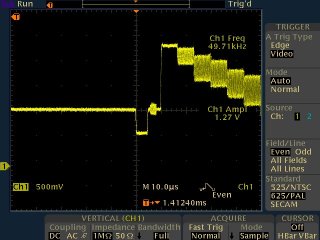
Analysing a
video test signal in my workshop using expensive digital test equipment.
Antique Video2000 machine running
in my workshop with chassis in service position.
You will have to take responsibility regarding copyright material.
If the recordings are your own work, then you own the copyright.
However if the recordings include TV programmes, films etc., then you
should try to gain permission from the original artists or
broadcasters. I have to leave this with you and your
conscience! I will not get involved in any blatant copyright
infringement of course. Confidentially and security is assured,
previous customers have trusted me with tapes including:
Company Confidential
Court case evidence
Very personal private
Irreplaceable footage of deceased family, of weddings, of children
growing up
This site is run for the purposes of keeping my collection of video
equipment in good working order, and to make people happy by providing a
useful video to transfer service. This is why I am prepared to
accept some models of old video recorder as part or full payment for
transfers, and why my prices are lower than the large London based
companies. It's also the reason I can put more time and effort into
your transfers, because I take pride in getting the best possible
results. What you get are top quality transfers at the UK's lowest
prices, not fancy packaging that some companies include "free".
Smaller jobs are often done same day, no need to wait three weeks like a
certain company in Glasgow has been known to do. You also get
flexibility, I will always try to help if you have special requirements.
We have a new
and easy order page, just select what kind of tapes you have and
supply your details.
I don't do cine film transfers, but can recommend Chris at Save
Those
Memories who do.
Though I will handle work from across the globe, if you are looking for
a Video tape to DVD Conversion Service within Australia then do
consider http://www.videotapes2dvd.com.au
Everything you ever wanted to know about Sky satellite TV see www.satcure.com
DVD players buyers information and products at 3 Wise Monkeys
Service manuals for lots of old equipment are available at
the very helpful site http://www.nostatech.nl/
For computer equipment including hard drives, I would
recommend you visit Ebuyer.
If you have a dead or unwanted interesting video recorder in the UK, I
will happily pay the postage (typically less than £12 with Royal Mail
Parcels) to have it sent to me, so that I can try to repair it and find a
new home. I can use all Sanyo Beta front loader machines, also the
Sanyo VTC5000 and VTC5150, and any Sony Beta machine from SL-C9
onwards. Unwanted Video2000 format machines may be welcome too, and
early Philips N1500 or N1700 machines or other oddball formats.
(Generally I do not want VHS video recorders, nor analogue camcorders of
any format.) Sony miniDV and Digital8 camcorders are also of
interest. Also, if you have any service manuals for old video
equipment which you don't need, they would also be useful to me. My
wanted list also includes:
Any SVHS machine which includes the TBC (Timebase Corrector) feature
V2000 machine with XP (extended play) capability such as Grundig 2080
or Philips V2840
Secam compatible N1700, V2000 and CVC recorders from France.
N1500 / N1502 video recorders or video heads for the same
Sanyo/Toshiba V-Cord video recorders.
DPS375 SP timebase corrector from Digital Processing Systems.
Umatic Dub cables.
HDCAM-SR player.
Laserdisc players.
I can be contacted here if you
have any of these, and I may accept non-working but intact video recorders
of the above mentioned models, in full or part exchange for transferring
your recordings.
Great, what do I do next? How to request a video
transfer.
We have a new
and
easy order page, just select what kind of tapes you have and supply
your details.
Audio and Video tapes transferred to DVD or computer
Visitors since this counter installed on November 13 2005:

 Analysing a
video test signal in my workshop using expensive digital test equipment.
Analysing a
video test signal in my workshop using expensive digital test equipment. 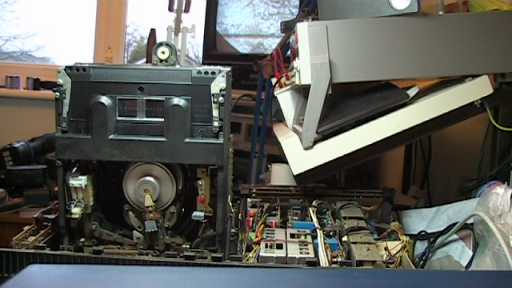 Antique Video2000 machine running
in my workshop with chassis in service position.
Antique Video2000 machine running
in my workshop with chassis in service position.